If in you college restriction for browsing some websites and some security because which you can not surf most famous websites then........
Saturday, August 13, 2011


Saturday, May 14, 2011
Registered Antivirus Free For 3 or 6 or 12 Months
Hello friends today i am going to tell you how and which antiviruses you can registered free.
You can reg. more antivirus free for 2 or more than two months.
Like Quick Heal Antivirus, Avast and avira antivirus.
Following are the steps for register uick heal
1-> Install Quick Heal Antivirus
2-> After that go to register tab and click on it.
3->And fill the information that reuired
4->Finish
You can reg. more antivirus free for 2 or more than two months.
Like Quick Heal Antivirus, Avast and avira antivirus.
Following are the steps for register uick heal
1-> Install Quick Heal Antivirus
2-> After that go to register tab and click on it.
3->And fill the information that reuired
4->Finish
Friday, February 4, 2011
Hide Folder in XP
Helllo Friends Today i tell you how to Hide Foder in xp Using my own created video tutorial
Wednesday, January 26, 2011
Check computer configuration
Hello Friends Today i will tell you how to check computer configuration(RAM,Processor,etc.)
Some time we need to check how much of RAM(size e.g 256MB,512MB).
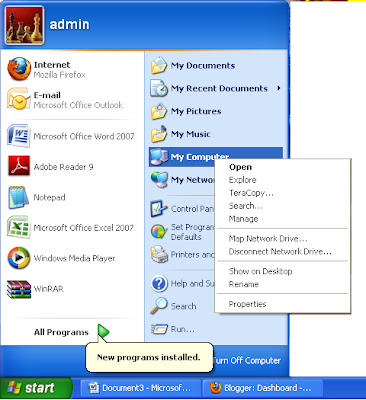
If you want to check configuration then :->
1.Go to "START"
2.Right click on MyComputer Icon
3.Click on "Properties".
Now it will Show window in which it show RAM size and Processor
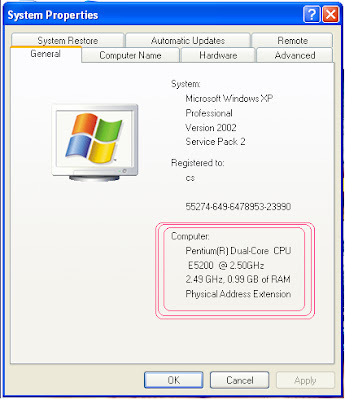
Some time we need to check how much of RAM(size e.g 256MB,512MB).
If you want to check configuration then :->
1.Go to "START"
2.Right click on MyComputer Icon
3.Click on "Properties".

Now it will Show window in which it show RAM size and Processor

Friday, January 7, 2011
Get XP/Vista Password
Hello Friends,
If you are in trouble because of forgetting password of Your System, then i will tell how you can get your password without pay money. Yes, it is totally free.
There is one software which help you to get back your password freely.
That's Name is " OPHCRACK ". This software is totally free of cost and you can download it from following link:
Click Here......
Thursday, December 16, 2010
Disable Windows Alert Message
Most Of the you have or alwayas get windows alert because of certain resons like:
1 Antivirus is Not installed

We can solve this problem using following steps:-
1.Click on "START" Button
2.Go to "Control Panel".
3.Go to "Security Centre".

4.Click on "Change the way security Center alerts me"
(Which is left hand side on Security center)
5.Uncheck all options
And that's it!!!!
1 Antivirus is Not installed
2 Antivirus is OutOfDate(Not Updated)
3 Automatic Update option is OFF

We can solve this problem using following steps:-
1.Click on "START" Button
2.Go to "Control Panel".
3.Go to "Security Centre".

4.Click on "Change the way security Center alerts me"
(Which is left hand side on Security center)
5.Uncheck all options
And that's it!!!!
Wednesday, December 15, 2010
Disable Error Reporting
Many times we suffer form error and we have two option likes "Send Error" and "Don't send error".
But most of the time we click on "Dont Send" and unfortunatel our running program is closed.
If you want prevent this problem in windows xp then follow the steps,
we desable error reporting using following steps:
1. Right click on "My computer " icon.
2. Go on properties.
3. Click on "Advance" tab
4. Click on error reporting
5. Click on "Desable error reporting"
6. Click on "OK" and Close.
But if you use Windows Vista or Winndows 7 then download following PDF file and Follow the step.
http://www.ziddu.com/download/12985858/DisableErrorReporting.pdf.html
But most of the time we click on "Dont Send" and unfortunatel our running program is closed.
If you want prevent this problem in windows xp then follow the steps,
we desable error reporting using following steps:
1. Right click on "My computer " icon.
2. Go on properties.
3. Click on "Advance" tab
4. Click on error reporting
5. Click on "Desable error reporting"
6. Click on "OK" and Close.
But if you use Windows Vista or Winndows 7 then download following PDF file and Follow the step.
http://www.ziddu.com/download/12985858/DisableErrorReporting.pdf.html
Create short cut for hibernate
Most of the we read how to create shortcut of Restart/Shutdown But i will tell you how to create shortcut for Hibernate.
Following is the link of PDF File which tell you how to create shortcut for Hibernate.
Following is the link of PDF File which tell you how to create shortcut for Hibernate.
Clear IE7 Browsing History From the Command Line
Most of the time we want to hide what we surfing on InternetExplorer(IE) because of some resons.
Following PDF files teach you how to clear IE7 Browsing(Surfing history) from command line.
If You dont know how open command prompt,then use following steps:
1. Click on start button
2.Click on Accessories
3.Click on RUN
4.cmd or command
After this use steps thats given in following PDF
http://www.ziddu.com/download/12977469/ClearIE7BrowsingHistoryFromtheCommandLine.pdf.html
Following PDF files teach you how to clear IE7 Browsing(Surfing history) from command line.
If You dont know how open command prompt,then use following steps:
1. Click on start button
2.Click on Accessories
3.Click on RUN
4.cmd or command
After this use steps thats given in following PDF
http://www.ziddu.com/download/12977469/ClearIE7BrowsingHistoryFromtheCommandLine.pdf.html
Font installation
Most of the time we required to install fonts in OS.
We know how to get font file from internet but we dont know how to install it.
We just open file and click on done button, but still it does not installed in OS.
Following PDF file tell you how to install Font in OS step by step
http://www.ziddu.com/download/12977370/ChnageFont in window.pdf.html
We know how to get font file from internet but we dont know how to install it.
We just open file and click on done button, but still it does not installed in OS.
Following PDF file tell you how to install Font in OS step by step
http://www.ziddu.com/download/12977370/ChnageFont in window.pdf.html
Saturday, December 11, 2010
Remove virus free from computer
Remove virus "FREE" from computer.
Using BitDefender Rescue CD. It is Live CD.
Steps 1 :- Download ISO image from following link:
http://download.bitdefender.com/rescue_cd/
Steps 2:-Burn this image in disc using Nero
Steps 3:-Boot this disc into cd/DVD rom
Steps 4:-Follow the Instruction on the screen
Using BitDefender Rescue CD. It is Live CD.
Steps 1 :- Download ISO image from following link:
http://download.bitdefender.com/rescue_cd/
Steps 2:-Burn this image in disc using Nero
Steps 3:-Boot this disc into cd/DVD rom
Steps 4:-Follow the Instruction on the screen
Sunday, December 5, 2010
Access Denied !
Hello Friend's,
Today i will tell you ,"how to remove an error when you open folder or File".
When you open any file or folder and you got an error like access is denied , But if you want to open that file
or folder in any how condition then , thir is a software which remove this error is "Unlocker".
Using this software you can rename that or move or delete that folder/file.
1. If you want to open that folder/file then using software rename or move that folder/file.
2. If you want to delete that folder/file then using software there is direct option is available.
www.filehippo.com/download_unlocker/
Today i will tell you ,"how to remove an error when you open folder or File".
When you open any file or folder and you got an error like access is denied , But if you want to open that file
or folder in any how condition then , thir is a software which remove this error is "Unlocker".
Using this software you can rename that or move or delete that folder/file.
1. If you want to open that folder/file then using software rename or move that folder/file.
2. If you want to delete that folder/file then using software there is direct option is available.
www.filehippo.com/download_unlocker/
Subscribe to:
Posts (Atom)